Vesica Blog - Taking museum and art collections to the cloud

November 28, 2012

Thanksgiving from Vesica – Report Printing

On Thanksgiving day last week we released several improvements across the Vesica platform, along with an initial version of the report printer which allows you the ability to sort and filter your collections by any of the parameters stored in Vesica, then decide what you want to print about each one of them. Whilst a more comprehensive version down the road will allow you to build queries on your Vesica database (so, for instance, you might want to generate a view of your collection that shows you everything you have loaned out to museum X and that is insured by company Y with beneficiary Z and has a payout value of $250,000 – well, you’ll be able to build such a report, save it and re-run it at the click of  a button), the current report printing functionality allows you to build reports on top of the existing advanced search functionality.

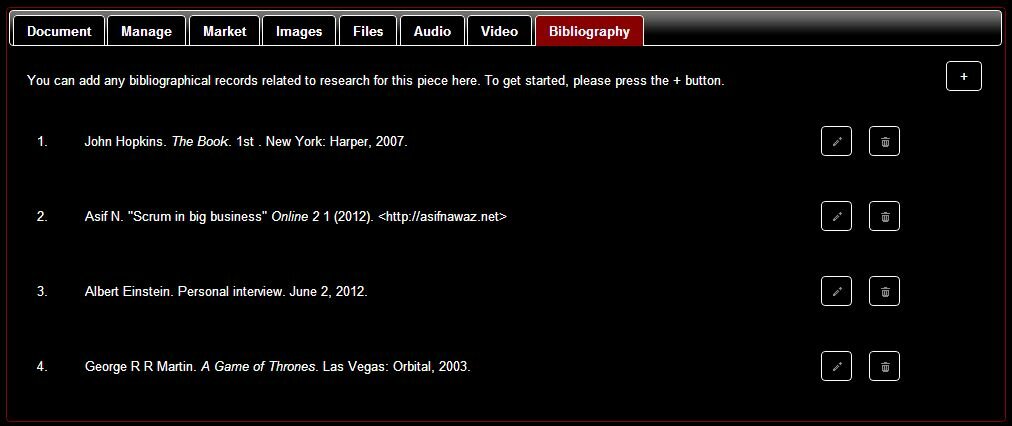
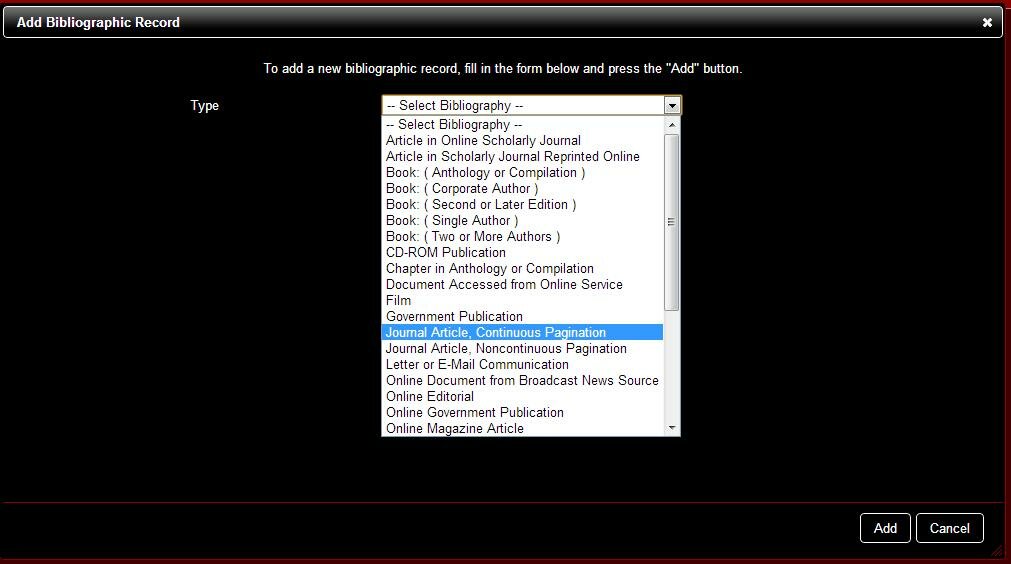
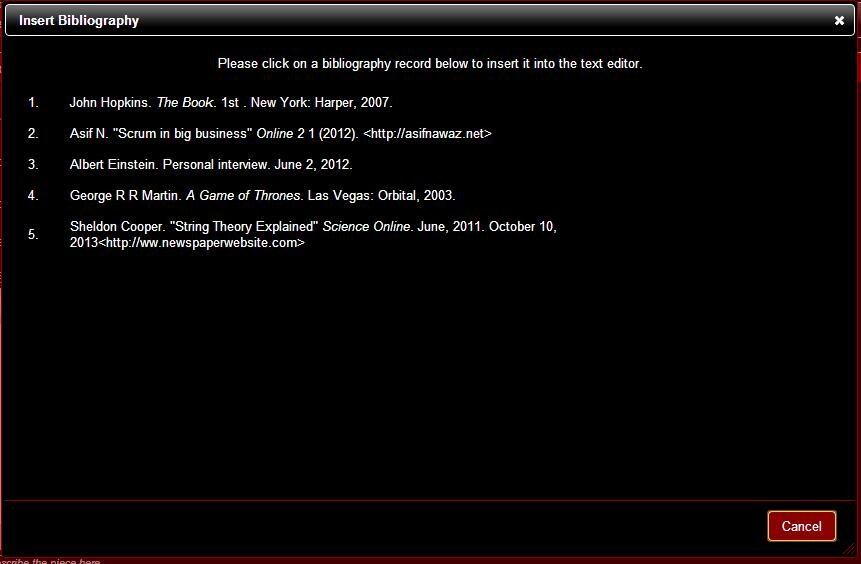
The ability to dissect and print various parts of information about multiple pieces has been a long requested feature from many different clients – so I’m happy to say that we’re there. This year will also see us release 2 more major features – including the research / bibliography tab and the redeveloped interactive maps timeline on mapquest.

See the video demoing the new report printing functionality below or on http://www.youtube.com/watch?v=m_hBWCgcwWM.

June 19, 2012

Vesica now available in Spanish

Good news –  Vesica is today available in Spanish (along with English). Following on from the previous post by Asif N about Vesica as a multi-lingual platform, the interface of the application is now available in Spanish. This is the first step in the journey to internationalization and rolling out Vesica as a multi-lingual application.

As a user, you can set your own preferred language at the account level. This means that whilst you can use Vesica in Spanish, other users who access the account can still choose to see the application in English.

Switching to Spanish is a simple, 3-step process.

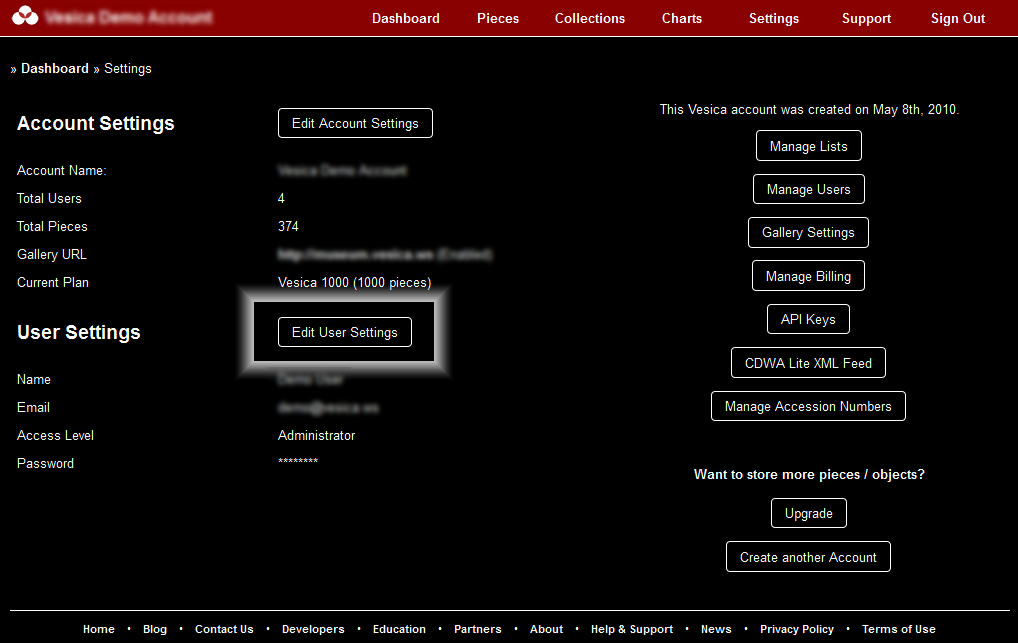
1. Once your signed-in to your Vesica account, go to Settings (see screenshot below).

Settings

2. In settings click on the Edit User Section.

User Settings

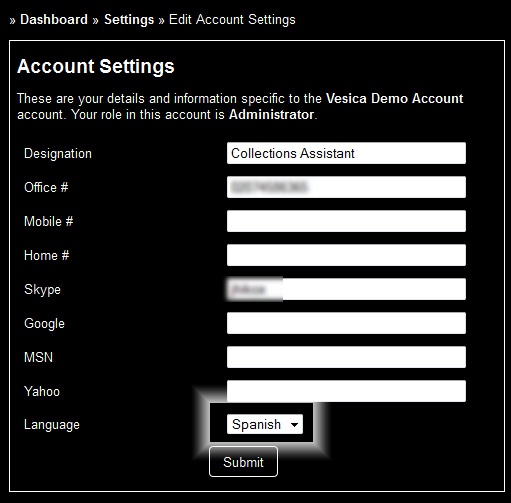
3. On the left hand panel titled user settings, the last option allows you to choose your language. Make the appropriate choice and press submit – and you’re done.

Choose Language

The system will now keep track of your preferred language each time you sign-in to the same account.

Have more questions? Please comment or raise a support ticket from within your Vesica account.

May 14, 2012

Pricing Museum Collections Software per Object

In the last few weeks, I’ve been asked on more than one occasion about what it is that lead us to pricing Vesica per piece / object in a museum’s collection. It’s true that this is a rather unorthodox  pricing model, not just in the museum / art collection sector, but for Software-as-a-Service solutions across all industries.

If you look at any SaaS or cloud based solution, the pricing is a combination of storage, a unit of some relevant measure (be it number of projects, number of domains, number of sites, etc.), and number of users. There’s a reason why many of these applications are priced this way – it’s generally due to the way public / private clouds are typically priced. For example, if you have a look at Amazon EC2 or S3 pricing, Microsoft Azure Pricing, or Heroku’s pricing model, it might begin to make some sense. These pricing modules are generally wrapped into some kind of algorithm based on the number of users and projects, etc. that the application might provide to a typical user to then come up with SaaS pricing, which the consumer pays.

To me, really, most of that is gibberish that is not always relevant to the user. Why, as the consumer of a B2B application, should I be bothered about things like storage in Gigabytes, or the number of users when it does not directly correspond with my business? A larger number of users does not always translate to increased revenue for businesses, certainly not in sectors like museums and heritage, where volunteerism reigns supreme.

So, for Vesica, we decided that our pricing has to be relevant. A museum’s collection is its heart and soul. If the collection is growing, it’s a good sign – the museum might generate revenue with the new addition to their collection over time. Perhaps the museum also has funds if it is acquiring. In any case, it’s a relevant measure for a museum, just like number of projects would be for a web development agency or number of companies would be for an accounting business.

When speaking with curators or museum directors, it is extremely difficult to strike a common cord if you start talking Gigabyes, Terabytes and number of users. It’s worse, if you sell desktop based museum software, and you have to work in the type of hardware you would need, along with setting up networks and what not.

We wanted to make Vesica simple and relevant – and I think we’ve done that.

Not only is the pricing relevant, it will save over 90% of the museums 30% or more when compared with any other solution in the market with similar functionality. The fact that we’ve grown to almost 150 customers in over 30 countries since the Vesica platform was launched just over a year ago is a testament to that.

Would you like to see Collections Management Software priced differently? Let’s hear your thoughts.

March 12, 2012

What would you save? Museums or Libraries?

Filed under: Education,Museums & Exhibitions,News — Tags: , , , , , — Asif N @ 12:19 pm

At our last Museum Professionals MeetUp in London, an interesting question not only sparked a great discussion, but it has inspired me to share some thoughts – many of those based on our discussion. The question, in effect was:

“With government funding cuts across the UK, many libraries and museums are already closing their doors. What would you like to save, your local library or museum?”

It’s a very relevant question – but I don’t necessarily think it is the right way to approach the subject. Like small businesses, I think many museums and libraries have a rather bad attitude towards financial aid – just like small business believes it is entitled to public funding and money that the government should set aside for them, museums and libraries have also become increasingly reliant on such free money. Granted, museums and libraries make substantial (if not great) contributions to the intellectual, cultural and dare I say spiritual development of society, so they are actually entitled to social investment from public funds, but a big problem with both museums and libraries is the lack of guidance on how to invest this money effectively rather than just spending it.

The more project managers, curators and consultants I meet from the museum industry, the more I think that museums need guidance on how to maximize the money they spend. Just like big business has learnt to adopt cost efficient technologies and processes, museums must do the same. In addition to aiming for increased spending, museums MUST, in these difficult times, also look for ways to reduce existing expenditure.

The trouble is, neither museums nor libraries do that – the results, at least, are not visible in the UK. I’ve often also felt the same, self-destructive sentiment from museum and library employees:

“We’re already paid so little for what we do, so we don’t feel the need to drive change or change the way we work – we’d rather see the institution shut down.”

Whilst that is a paraphrase of the same sentiment from multiple individuals, it is a disturbing thought. Many of these people claim to have joined museums and libraries because of their love and passion for the arts and literary work, so this sentiment is disturbing at best.

Many museums, both large and small, can save hundreds of thousands of pounds each year by simply streamlining their processes, removing bureaucracy, spending money where it should be spent and utilising technology effectively. Management consulting has a saying: “Expensive is almost always cheaper” – and it is, in the long run. Museum employees have this attitude because of their years of volunteering – museums have this attitude because they don’t know anything other than volunteering!

I believe that we can save both our museums and our libraries. In fact, if the government and libraries put their head together (and maybe spoke to me or one of my colleagues, for instance), I don’t see any reason why libraries can’t compete with Amazon and why museums need to waste more money in times when museum revenues are falling.

Whilst I will discuss measures to help museums and libraries survive over the coming months, I think it’s only important to say that both museums and libraries MUST evolve, not just to engage visitors and readers, but to upgrade, make efficient and streamline their operational models.

December 22, 2011

Export Object Data to Microsoft Word

Documenting your collection just became more flexible – with Vesica, you can now print different parts or all of the information about an object to a Word document. It’s a fully-formatted export, and once all the information is in Microsoft Word, you can edit to your heart’s content. From the ability to do further research work, print and file hard copies, collaborate on objects at meetings, or simply export information about a piece into Word to customize and print out labels for exhibitions – in terms of formatting, editing and presenting your data, this new feature lets you do what you need in a tool so many of us have become accustomed to using.

Printing an object to MS Word is easy – you will do exactly what you’ve been doing to print your object information – except now on the window that allows you to choose which sections to print, in addition to a “Print” button you will also see a “Print to Word” button. Just click on this and you’ll be prompted to download the details of your object as a Word document – simple!

Here is a sample link to an object’s data extracted from Vesica as a Microsoft Word document.

» Download Sample

November 25, 2011

Vesica charts get drill down functionality

Filed under: News,Using Vesica — Tags: , , , , , — admin @ 3:29 pm

Vesica users today will be able to drill down from Vesica charts into detailed data about their collections. This functionality makes interacting with your collections easier, faster and more intuitive. Where as before you could just visualize your collection via the pie charts and would have to search independently to get the list of objects that made up the chart, you can now simply click on the appropriate slice of the pie in the chart, once to slide it out, and a second time to click through to get a list of objects that make up the statistic.

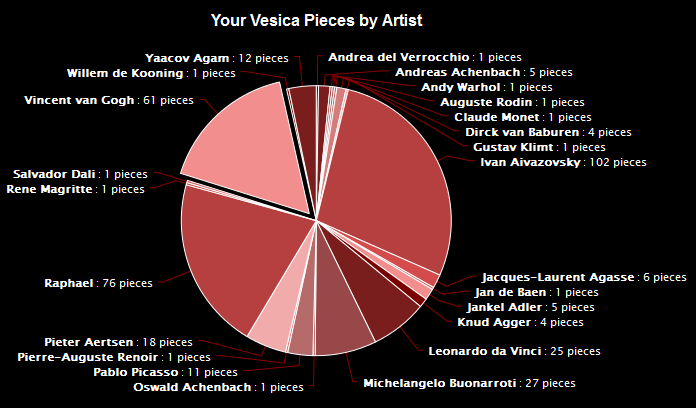
Let’s show you how it works. Below is a pie chart of all the artists who have work listed in the account we’re looking at. You’ll also note in the chart that we’ve clicked on Vincent Van Gogh once, so his piece of the pie has slid out.

Pie Charts - Drill Down Functionality

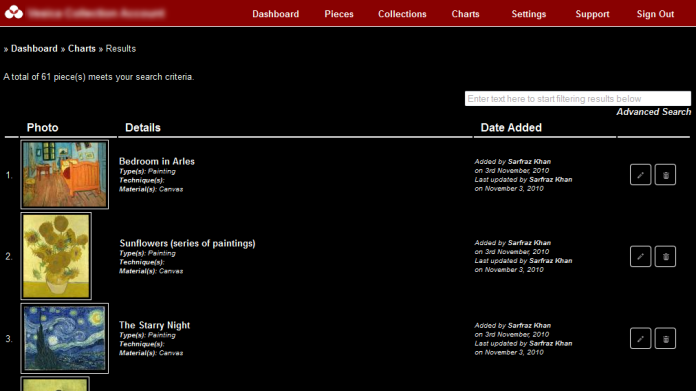
 If you clicked on the Van Gogh piece of the pie again, you’ll go to a page that will list all 61 objects in your account which have Van Gogh tagged as the artist.

Van Gogh in Vesica

The drill down functionality has been applied to all 7 charts in Vesica.

November 8, 2011

The Vesica Partner Program

The Vesica Partner Program was launched earlier this week and is now accepting applications.

Ideal for professionals and companies who work with the museum, heritage, art or cultural sector, the Vesica Partner Program offers a host of benefits to Partners, including:

  • Additional, on-going revenue

  • PR Opportunities

  • Participation in our Webinars and at Customer Events

  • And much, much more…

Vesica is a pay as you go, cloud-based collection management software application for museums, collectors and heritage organisations. With unlimited storage, CDWA Compliant data feeds, streaming audio and video, charts and other interactive educational and marketing tools, Vesica offers museums and heritage organisations a SaaS option, enabling  them to save hundreds of thousands of dollars in IT and licensing fees in addition to gaining operational efficiency and increasing revenue streams.

To become a partner, apply today at http://vesica.ws/partners/.

September 28, 2011

Annotate and Crop Images in Vesica

With the update this week, you can now annotate and crop images inside Vesica. This has been a popular feature request and after much consideration (and testing), we’re glad to announce that you can do this in the browser whilst using Vesica, so you don’t have to use your image editing software to crop or annotate images.

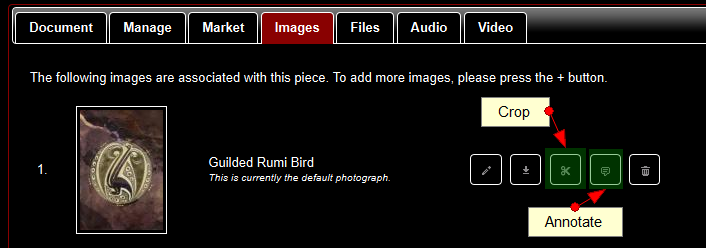
Cropping and annotating with Vesica is easy – next to each image in the “Images” tab when editing a piece, you’ll now see 5 buttons. The third button allows you to crop, the 4th to annotate, as shown below.

Crop and Annotate

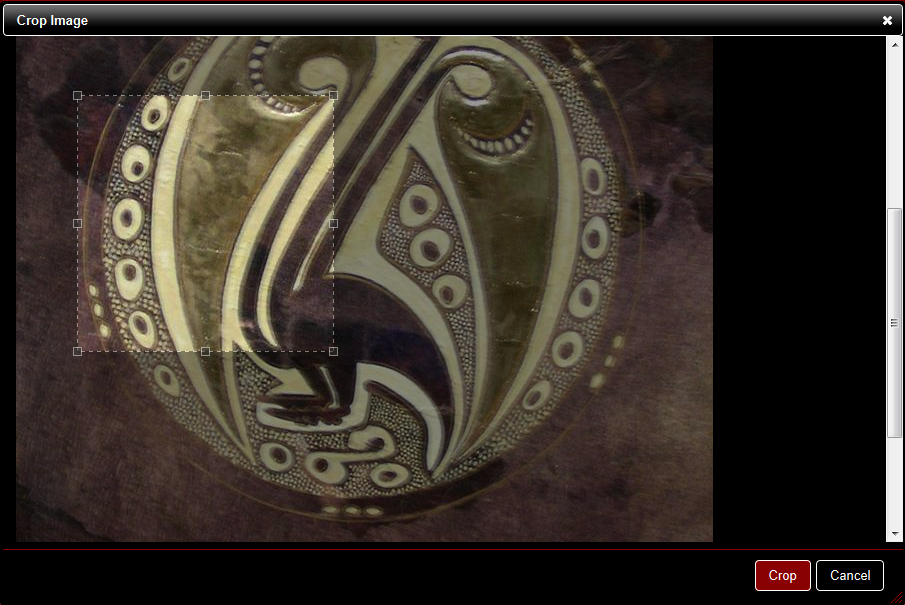
When Cropping an image, Vesica automatically saves the cropped version as an additional image, in case you need to retain both the original and the cropped versions. Cropping is really quite simple and intuitive – you select the part of the image you want to crop and press the “Crop” button – Vesica does the rest.


Cropping with Vesica

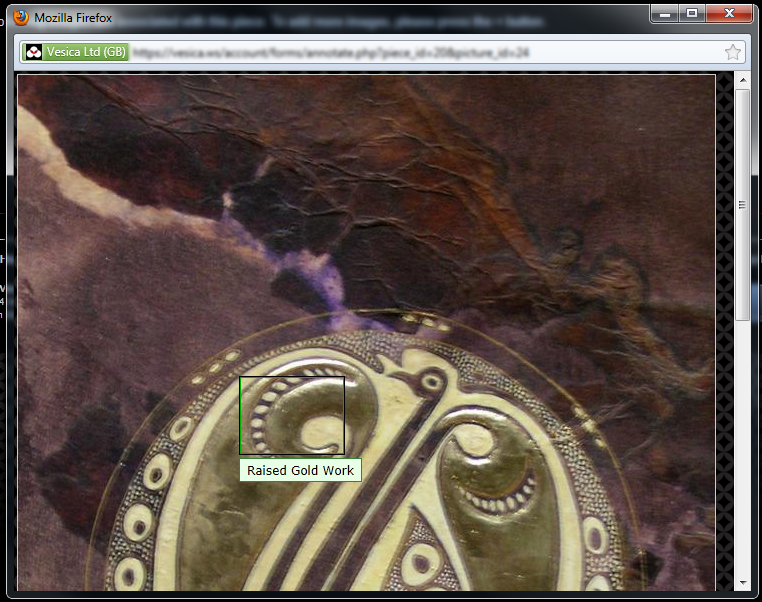
Annotations in Vesica are stored as additional layers on top of the image, which means your original image remains unchanged. When you view the image in your account, annotations appear as you hover over the image (as shown below). Annotations are not shown in the online galleries within Vesica or on external sites if the image is displayed via an API.

Annotate
Annotating with Vesica

It’s really all quite simple and as always, the best way to get a hang of it is to start using it! Please feel free to post any feedback or questions, or contact support if you need assistance with the above features.

August 19, 2011

Update: Streaming Video, Audio and Search Report Printing

Filed under: News,Technology — Tags: , , , , — Asif N @ 5:03 pm

As mentioned in Tuesday’s preview of today’s update, Vesica now supports audio and video streaming via HTML5 across a variety of browsers and formats. Here’s a brief overview of today’s updates.

» Audio / Video with HTML5

The audio and video integration simply adds on top of your existing piece and collection pages. You’ll see audio and video tabs across the top when you add / edit a piece or collection as shown in the screenshot below:

audio video tabs

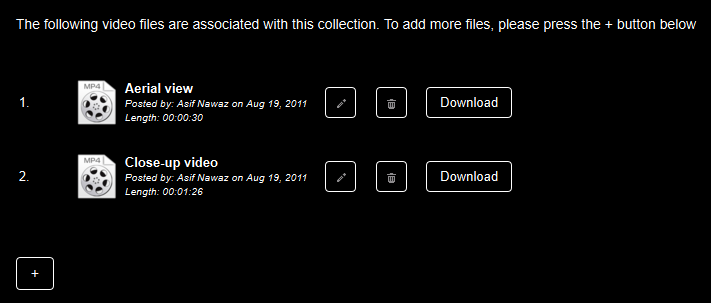
Adding and streaming videos is also really simple. Just click on the + button as shown below to add a video or audio file, and simply click on the file name to start streaming it. You can also change the file name / description, or download it.

video tab - vesica

You are currently able to upload the following formats:

Audio: MP3, OGG, WAV and WMA
Video: MP4, AVI, MOV, OGG / OGV amd WMV

» Icons

You’ll also notice the use of the pencil and trash can icon in the above screenshots. In this release, we’ve rolled out icons for all common functions, including editing, deleing, saving and printing.

» Printing

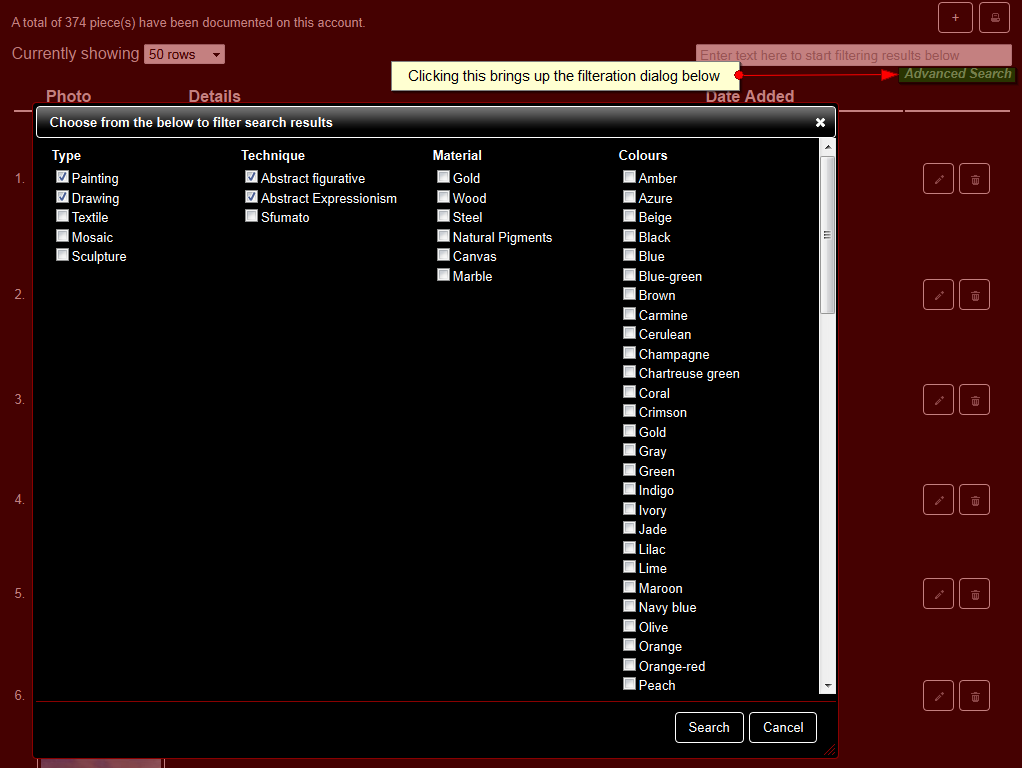
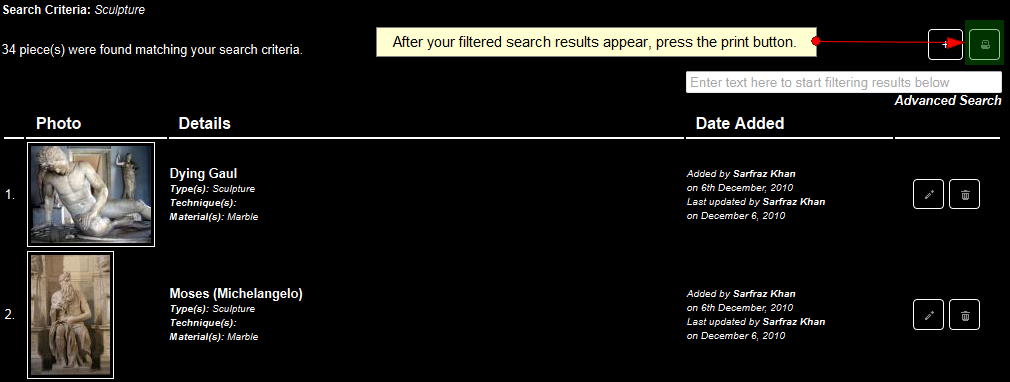
In addition to being able to print detailed reports about a particular piece or object in Vesica, you can now pring reports about listings of pieces filtered by virtually any of the parameters. You can do this by running an advanced search report on your main piece listing page. Simply select from the criteria you need and once the results appear, click on the print icon. The screenshots below will show you how easy it is.

1. Click on Advanced Search to bring up the search dialog, choose your criteria and press the Search button.

2. Once your search results appear, just press the Print button to print the results. It’s simple!

Today’s update brings us a step closer towards making Vesica a collection management platform that supports media of all types for museums and collectors.

There’s more to come on additonal planned features – visit http://vesica.ws/features/ for more details or subscribe to our rss feed.

July 28, 2011

Vesica now available on Google’s Chrome Web Store

Filed under: News,Technology — Tags: , , , , , — vesica-press-releases @ 11:00 am

Vesica is today available on Google’s Chrome Web Store, which allows you to install apps within the Chrome browser for easy access. Install the app today by visiting https://chrome.google.com/webstore/detail/acdplfpagmdnkcaekeeklfdiphcpnnep. The Vesica app is available free to all users.

July 23, 2011

Stream your Audio Guides in Vesica

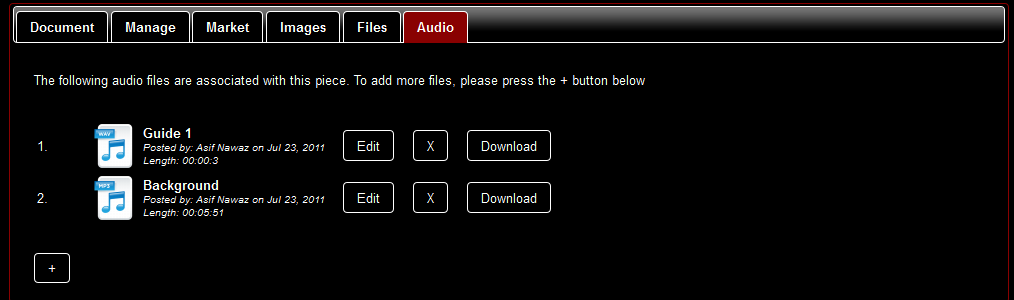
We’re very excited today about launching the audio management and streaming feature in Vesica. It’s an additional step towards making Vesica an all inclusive collection management application for museums and heritage organisations. In the next few weeks, video support will also be added.

After some planning, we decided to implement audio support in Vesica using HTML5. Whilst this has some limitations, in the long run, we believe it will be of great benefit to our customers. Using HTML5 to playback audio means that  you may face some compatibility issues with certain file types in certain browsers but it will allow you to stream audio on Apple iPad and other Google Android and Windows 7 powered PCs. For instance, Mozilla FireFox does not support streaming MP3s, but Chrome, Safari and IE9 do (even mobile versions of Chrome and Safari do). For more details on compatibility with streaming, please see this FAQ. Of course, you can always download your audio files to play them back on your Mac or PC.

Audio files in Vesica can be associated with a particular object or a collection. Just like all other tabs on your piece or collection management screens, you’ll also see an ‘Audio’ tab. Here’s what it will look like:

Audio in Vesica

Audio file formats currently supported are MP3, WAV, WMA and OGG.

Audio files will tie in with the Vesica ecosystem, allowing you to re-use the guides in online exhibitions as needed.

July 13, 2011

Vesica API (beta) Available Today

Filed under: News,Technology — Tags: , , , — vesica-press-releases @ 2:11 pm

A beta version of the Vesica API is available today.

As one of the most requested features, the Vesica API allows you to add, view and manage your objects and collections by sending various parameters via the “POST” method. In return, the API sends XML based on the received parameters. The Vesica API can be used to export data from your Vesica account or to display information on your website or other in other applications.

The API is being developed actively and will be updated from time to time, as we add additional functionality to it.

To get started, see the API documention for developers on http://vesica.ws/developers/.

July 5, 2011

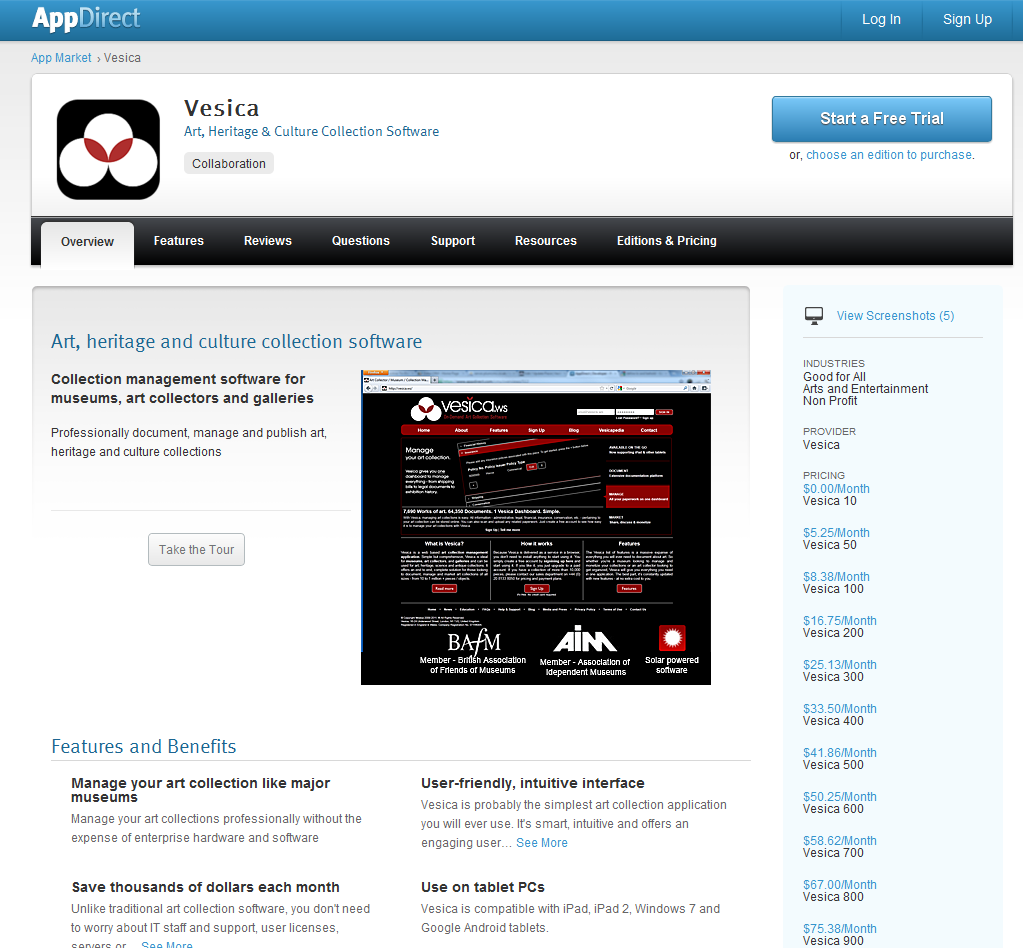
Vesica is now available on AppDirect

Filed under: News,Technology — Tags: , , , , — vesica-press-releases @ 5:28 pm

July 1, 2011 – Vesica is now available via the AppDirect marketplace.

AppDirect is a free web-based application which allows you to use and manage web-based applications from anywhere in one simple and secure site. It’s also a marketplace that provides the latest web-based applications. It really is based on the concept of simplifying the use of software on the internet, so we’re glad to be a part of it.

“The integration with AppDirect is another step towards increasing the global awareness of Vesica,” says Asif Nawaz, Founder and Chief Software Architect at Vesica. “With AppDirect’s single sign-on functionality, museums and other art, heritage and cultural organisations can now fully benefit from the use and pricing structure of SaaS applications without the hassle of  managing cross application usernames, passwords and security controls.”

Vesica is the first art collection related application on AppDirect.

Already use AppDirect? Sign-up for Vesica on https://www.appdirect.com/apps/552.

For further information, please contact the Vesica office on +44 (0) 20 8133 8050 or press@vesica.ws.

June 20, 2011

Vesica joins AIM and BAFM

We are pleased to announce that Vesica is now part of the Association of Independent Museums in the UK and the British Association of Friends of Museums.

These memberships come as part of our larger plan to integrate with the heritage, culture and museum communities in Britain and to help, wherever and however we can, with our expertise and Vesica.

As such, Vesica can help member organisations plug looming funding gaps, save costs and monetize their existing collections in many ways, in addition to helping museums digitally document, manage and archive their collections.

For more information, or speak with a member of our team about how we can help, please call 020 8133 8050.

June 13, 2011

Detailed Report Printing with Vesica

Filed under: News,Using Vesica — Tags: , , — admin @ 1:20 pm

The weekend’s release has added some powerful object / piece level report printing functionality to Vesica. The report is generated in an HTML format, so you an easily print it to a PDF of paste it into a Word document and edit to your heart’s content. We’re also working on an export to word feature, which will allow you to export different parts of the piece management system directly into word.

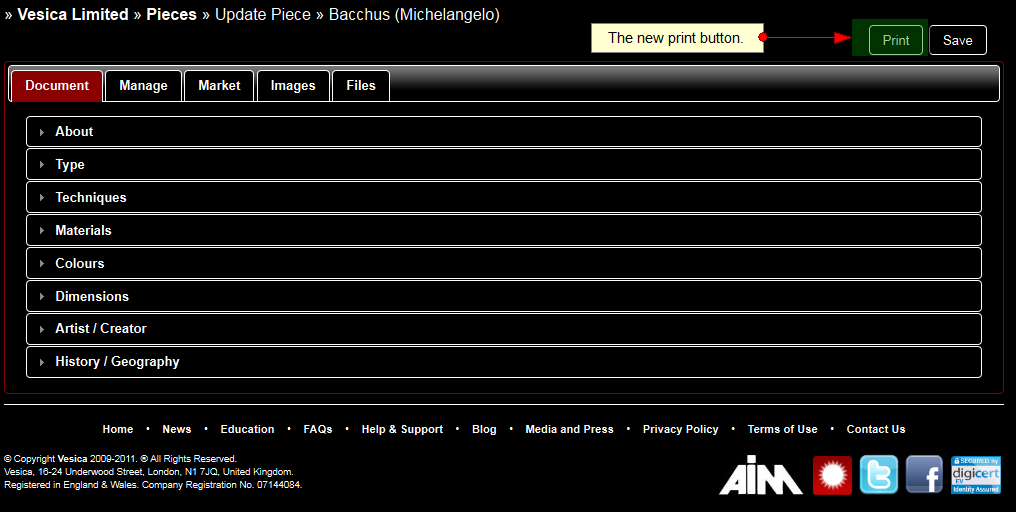
Here’s how you can print a report. You need to log-in to your Vesica account and edit the piece you would like to print information about. The edit screen now has a Print button on the top right side of the screen as shown below:

print-button-vesica

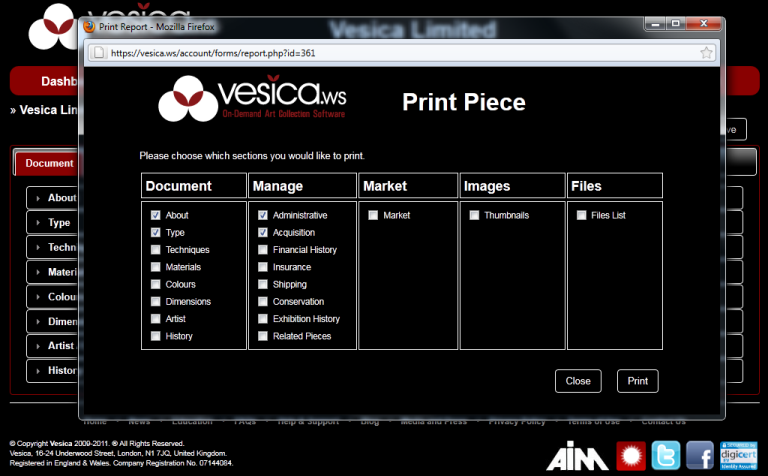
When you click on the print button, you’ll get another pop-up window which will allow you to choose the parts of the piece / object you would like to print. It’ll look like the screenshot below:

Print Object Window

Just check the boxes for the appropriate sections you would like printed, and press the Print button to the lower right of this window. Almost immediately, this popup will close and a new browser tab will open the report in printable / exportable format. When you’re done with that report, simply close the tab and you’ll go back into your Vesica account.

As always, we’re here to help answer any questions you have, so please do ask, via the blog, or support centre.

May 1, 2011

iPad and Tablet PCs now supported

Filed under: News,Upcoming Features,Using Vesica — Tags: , , , , , — vesica-press-releases @ 6:20 pm

Vesica - now available for tablet PCs

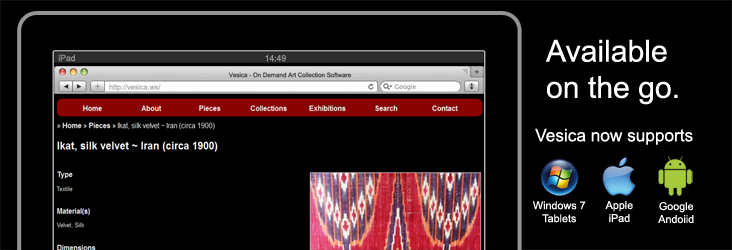
With today’s update, Vesica now supports Apple iPad and other Google Android and Windows 7 powered tablet PCs.

This mobile compatibility is one of many upcoming add-ons and we believe it to be of great benefit to museums and collectors, who can now start archiving and documenting collections on the go. All major devices that work with the above operating systems and have the latest mobile browser related updates will support Vesica. No third party software or app installation is needed. Simply visit http://vesica.ws on your mobile device, sign in and start using Vesica.

We’re also offering financing on iPads and other tablets with Vesica. If you are a museum, you may also be eligible for free tablet PCs with Vesica. More information on this will be coming soon.

In the mean time,  please contact our sales department for more details.

April 26, 2011

The new Vesica. It’s here.

Filed under: News — Asif N @ 1:51 pm

As announced in my post of April 13, 2011, I’m pleased to tell you that the new, upgraded Vesica was released yesterday (April 25).

As I had mentioned, the new release gives Vesica a completely new interface, a new chart producing system and a new piece management and file management section, to name a few things! Here is a brief (and by no means comprehensive) run down of some of the things you should know about this release.

  • The new feature list is available on http://vesica.ws/features/.
  • As requested by so many visitors, the new price list is published on http://vesica.ws/pricing/.
  • A new FAQ system has been made available on http://vesica.ws/faqs/. We’ll be adding FAQs here over the coming weeks that will help with any basic support related queries.
  • Browser compatibility. Whilst we are still working out some compatibility issues with Internet Explorer 9, the platform should work fine with the recent and latest releases of Chrome, FireFox, Safari and Opera.
  • Should you have any issues or technical difficulties, please raise a support ticket using the support system available in your Vesica dashboard.
  • Please note that all functions that depend on payment processing, including account upgrading and gallery sales, are currently inactive. We are working with our new payment provider to get these activated at the soonest. An update will be published in the next few days.
  • Should you require an upgrade, please use live support or call us on +44 (0) 20 8133 8050.
  • Sign in (or sign up, if you don’t have an account), use Vesica and add some pieces / objects to your account. That’s the only way to enjoy the new release. With its animated charts and sliding page sections, it really is fun to use!

Also, if you’d like to receive our news releases and keep up to date with new features and articles on how to use Vesica, please subscribe to our RSS feed and mailing list.

April 13, 2011

The new Vesica – Coming Soon

Filed under: News,Upcoming Features — Tags: , , — Asif N @ 11:58 am

The New Vesica

We’ve been waiting for this as much as you have – it is with great pleasure that I am announcing the release date of the new version of Vesica – April 25, 2011.

The team has been hard at work for the last few months – we’ve been working day and night to put together something that I am truly proud of. This isn’t just a major upgrade, it’s a complete overhaul of the Vesica platform, and it is impressive (if I may say so myself).

Among other things, the new version boasts :

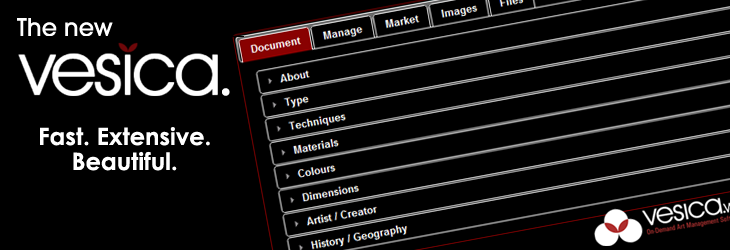
  • A completely new interface to search and edit pieces / objects and collections. This interface is fast and extensive, and feedback has been extremely positive during testing.
  • A comprehensive new section for object management – the software now allows you to extensively document, manage and market your art collection.
  • Speed – yes, it works almost as fast as a desktop application. There’s no page loading when you switch tabs, upload files or submit new information about a collection or piece.
  • Grace – this was important for me – we had to make sure that whatever we built was good to look at and graceful to interact with.
  • Advanced Search – now you just check some criteria boxes to filter your collection and all the relevant pieces show up. Type and further narrow the search criteria. It all happens lightning fast!
  • Charts – yes, now you can see beautifully animated charts that illustrate your collection by type, technique, region, dynasty or any of the other Vesica parameters.
  • Much, much more!

There’s a lot of good stuff in the new release in addition to the features mentioned above. We’ve looked at the art collection standard and gone the extra mile. We will also be publishing a regularly updated list of upcoming features with the new release.

Best of all, given the boost of new users we have had, we’ve been able to revise the pricing structure. A new price list will be published on April 25. I can, however, tell you that the free account now allows for up to 10 pieces, and each increment of 50 pieces from thereon is priced at £5. It’s nice and simple – and we like simple! In short, your existing account will only see a positive effect – piece allowance will go up and your monthly statement will automatically be adjusted to reflect the new price.

Watch this space for more updates over the next few days!

March 25, 2011

Change of Payment Gateway

Filed under: News — Tags: , , , — admin @ 12:26 pm

For various reasons, we at Vesica have decided to make the switch from our current payment provider to a new one.  This period of transition will take a few weeks and will go live with the new version of Vesica.

Until the change goes into effect, all payments on galleries, upgrades and new accounts will be taken over the telephone.

All existing customers’ payments will be processed as they have been before – unless you want to upgrade or downgrade your plan. If you are a new customer or would like to upgrade the plan you are currently on, please give the office a call on 020 8133 8050 and we’ll process the upgrade over the phone – it will only take a couple of minutes.

We will be advising all customers once the change-over has been processed. Rest assured, we expect the transition to be smooth.

We apologize for any inconvenience this may cause.

Thank you for your continued support!

February 15, 2011

Painting Techniques Inspired by Ottoman Textiles

A workshop by Nausheen Sheikh

Introduction

The Traditional Crafts are derived from the intertwining of wisdom (hikmah) and craftsmanship (fann or sinaah). Traditional textiles and costumes enable one to wander through the history of the world, from the rise of civilizations to the fall of empires, with a blend of diverse cultures, legends and religions.

Traditional textiles continue to resonate humble beauty and the substance of art is beauty and this is a Divine quality.

Join Nausheen Sheikh, Director of Research and Documentation – Islamic Art and Textiles at Vesica, for a workshop that will take you on a timeless journey through the history, techniques, symbolism and application of these Traditional textiles.

Traditional textiles are rich in pattern, colour and texture. This workshop will introduce students to the harmony of colours and an understanding of pattern created by Geometry and ‘Islimi’ – also known as the Arabesque – and the textural quality of textiles. This will be achieved through traditional painting techniques.

Expected Outcomes

  • To create a painted paper panel of a textile design inspired by the traditional textiles.
  • Design sketches and colour schemes inspired by traditional textiles.
  • Diary/sketchbook of the design process with stages and thoughts.
  • Textile design panel


Workshop Date, Time and Location

Date: Saturdays from 26 February to 19 March.

Timings: 10:30 am to 4:00 pm

Location: Office of Vesica Limited, 16-24 Underwood Street, London, N1 7JQ

Closest tube station: Old Street

Fees: £250 (materials included)


To Book call Vesica on 020 8133 8050 (Monday to Friday, 9am to 6pm)

December 24, 2010

Season’s Greetings and 2011

Filed under: News — Tags: , , , , — admin @ 3:26 pm

As 2010 is coming to an end, the team at Vesica would like to wish all users and readers happy holidays and a propserous new year.

In 2011, the Vesica gallery is due for launch along with the Vesicapedia platform.  Version 2 of the Vesica platform is also set to be released in Q1 of 2011. The new platform features extensive art management and art marketing functionality in addition to the current documentation platform. In addition, the new interface will result in an enhanced user experience with much faster response times.

Release dates for the above platforms will be announced in January, 2011.

November 1, 2010

Plans Announced for Vesica Institute

Filed under: News — Tags: , , — vesica-press-releases @ 12:10 am

The Vesica Board today announced plans to start working towards launching the Vesica Institute of Traditional Arts. Whilst the company has yet to announce any more details, the Vesica Institute will focus on offering courses in Traditional Arts and Crafts – a field that very few art schools are willing to explore. A plan is being prepared to get administrative, financial and legal paperwork in place for next year.

“Whilst we have talked about the Vesica Institute of Traditional Arts before, it is still in the very early stages of planning. At this point, all I can say is that the Vesica Institute will, like the Vesica software platform, strive to excel and will offer the best in terms of traditional education,” said Asif Nawaz, Director and Chief Software Architect at Vesica Limited.

We anticipate that the management team will make more information available in the first quarter of 2011, potentially offering courses to students in the second or third quarter of 2011.

October 22, 2010

Dedicated Support System Released

Filed under: News,Using Vesica — Tags: , , , , — vesica-press-releases @ 1:03 pm

As the Vesica user base grows, we’ve received support requests from users like yourself with questions about their accounts and how to use various aspects of the software via email and live support. Many of you also mentioned your hesitation in using the forum for support because there were details about your collection you did not want to share.

We’ve listened – Vesica now has a dedicated support system in place. Using the support system is easy – a link is availble from the Help and Support page on http://vesica.ws/support/. To access the support system, you must be signed in to your Vesica account. Once you’re there, you can create new support tickets or respond to existing ones you may have created before.

It’s easy to use – here’s what it looks like:

Vesica Support System

Vesica Support System

The Vesica Support System allows you to submit and track support requests specific to your account, 24 hours a day. In addition, whilst the Live Chat team is not available outside UK business hours, the Support System is monitored and support tickets are dealt with 24 hours a day.

It’s all part of our plan to improve Vesica and make customer service our number one priority.

October 5, 2010

The Artist Tab Gets a Makeover

When we made the switch from beta to live last month, one of the last things we had not had time to redo for wider user and browser support was the “Artist” tab under “Pieces.” In fact, several users approached us with concerns over the interface being too heavy for their browsers or PCs (or Macs). We, therefore, made this our number one priority and have released the new interface. It works faster, looks better, is easier to use and allows you to associate multiple artists with one piece or work of art.

The screen is split into two parts – one where you can see which artists are already associated with the piece and another where you can search and associate more artists to a piece or work of art. It’s as simple as typing and clicking – and you’re all done. No more scrolling through 10,000 artists to pick the right one!

Here’s a screenshot to give you an idea of how it now works:

New Artist tab

New Artist Tab in Vesica - Art Collection and Management Software

To see how this works for yourself, create a Vesica account or Sign in.

September 23, 2010

Free online art shop revolutionises student art shows

Filed under: For Art's Sake,News — Tags: , , — vesica-press-releases @ 10:05 am

Vesica, a revolutionary new art management software, is set to transform the ability of art students to promote their work, by offering them a free web-based platform to show and sell their art.

The system, which has recently completed beta testing, has been designed to help art collectors, galleries, museums and artists themselves manage their art collections and share information around the globe. Vesica’s document – manage – market model is unique globally in the art world.

A key part of Vesica’s capabilities is the way it provides an online art gallery, enabling artists to show their work – and offer it for sale. The Vesica online gallery enables anyone, from a collector to a student, to list up to three pieces of art for sale in the online gallery, free of charge. Additional items may be listed for a modest charge, and Vesica’s commission structure for sales is set well below comparative costs for traditional galleries.

“By allowing artists and collectors alike to have a free listing of their art, we are revolutionising the way art can be shared, experienced and purchased around the globe,” says Asif Nawaz of software development firm VAFTA, who developed Vesica. “For the first time, students can list their pieces and expose them to a worldwide audience, without charge.”

Vesica was developed in response to a specific request for a system that would allow an art collection to be effectively catalogued and documented. For the first time ever, its online system allows a collection to be fully documented and managed, with the system retaining a high level of information and photographs.

Galleries and photographers can make use of Vesica’s online shop facility to list art for sale, making it visible to a worldwide audience. And for museums, galleries and private collectors, there is the opportunity to share highly detailed information on a discretionary basis with other professionals around the world; making the loaning of artwork and the staging of special exhibitions easier.

Vesica’s software format is universal. Developed as an online software system, it has a simple monthly subscription and is accessed via the internet, making it easy to use whatever computer a subscriber has. Updates and support are available immediately and a growing discussion forum will enable art topics to be discussed by interested individuals globally.

Vesica is also a carbon neutral system, hosted using solar powered servers located in California.

For further information, please contact the Vesica office on +44 (0) 20 8133 8050 or press@vesica.ws.

Older Posts »

Subscribe to RSS Feed Follow Vesica on Twitter Join us on Facebook Join he Vesica LinkedIn Group

Home    •    Blog    •    Contact Us    •    Developers    •    Education    •    Partners    •    About    •    Help & Support    •    News    •    Privacy Policy    •    Terms of Use